What LCD2 means on your Asko dryer (asko dryer lcd2)
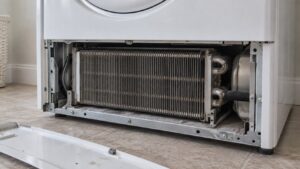
An asko dryer lcd2 prompt is a scheduled maintenance reminder unique to the TD70.3 panel, telling you to clean the condenser unit. It triggers automatically once every 100 cycles regardless of condition, purely as a preventive nudge, but it can also appear early if the control detects a blocked air passage that suggests the condenser genuinely needs attention sooner. Neither TD70.1 nor TD70.2 displays anything equivalent — this cycle-counter-driven prompt is new to TD70.3’s panel, and it is a maintenance message rather than a problem, so it does not point to a failed part.
Symptoms
Match what your Asko dryer is doing against the signs below before assuming the cause, since more than one problem can produce a similar picture. On the dryer the symptoms may arrive alone or in combination, sometimes gradually and sometimes the moment after a surge, an intensive cycle, or a fresh install.
- The display shows LCD2, often after a cycle finishes normally
- Drying performance may still feel fine when LCD2 first appears
- The prompt may reappear on the next cycle if the condenser is not cleaned
- LCD2 clears once the condenser has been cleaned and the reminder acknowledged
Common causes
There is rarely a single obvious cause on an Asko dryer, so the possibilities below are sorted from probable to unlikely. Testing them in that order tells you whether your dryer needs a simple adjustment or a repair with genuine OEM or trusted-supplier parts.
- Scheduled 100-cycle interval reached — the control counts cycles and prompts on a fixed schedule regardless of actual condenser condition
- Genuinely blocked air passage — lint or dust buildup around the condenser has restricted airflow enough for the control to flag it early
- Extended use with heavy lint-producing loads — towels, fleece, and pet-hair-heavy laundry accelerate condenser fouling between scheduled prompts
Troubleshooting steps you can try
Go through the steps on your Asko dryer from top to bottom before booking a repair, since the early ones cover the common causes. The moment mains voltage, gas, a hot cavity, water, or a sealed component enters the picture on the dryer, hand the job to a qualified technician.
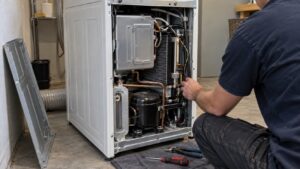
- Remove the condenser unit following the owner manual’s release procedure.
- Rinse it under running water until the water runs clear.
- Let it dry fully before reinserting it into the cabinet.
- Acknowledge or clear the LCD2 prompt per the display’s instructions.
- Repeat this cleaning routine on the same schedule going forward to avoid drying-performance drop-off.
Parts a technician may replace
Diagnosis on your Asko dryer may lead a technician to inspect, test, or replace the condenser unit and cabinet air passages. The failed part is confirmed on the dryer before anything is ordered, and only genuine OEM or trusted-supplier parts — matched by model, serial, and Art. No. — go back into the machine.
When to call a technician
LCD2 is a routine maintenance prompt, not a problem — it only warrants a technician visit if drying performance stays poor after the condenser has been properly cleaned on your TD70.3 dryer. This problem is rated Low severity, so there is no emergency with your Asko dryer — but if LCD2 keeps coming back on the dryer after the checks above, have a technician confirm the cause before any part is replaced. We handle your Asko dryer as an independent service with no affiliation to Asko, Gorenje, or Hisense, working only with experienced technicians and genuine OEM or trusted-supplier parts, and we back the labor on your dryer with a 30-day warranty. When you book, have your Asko dryer’s model, serial, and Art. No. to hand so the exact part for your build is matched before the visit and LCD2 is put right in as few trips as possible.
Related help and Asko resources
For a persistent LCD2 on your Asko dryer, book Asko dryer repair, read our other dryer error-code guides, follow the step-by-step repair guides, schedule service whenever works for you, or check your city on our locations page. A related condition on your Asko dryer is covered under LCD3 clean lint filter. For the official specifications behind your Asko dryer, visit the manufacturer at us.asko.com.