What F9 means on your Asko cooktop (asko cooktop f9)
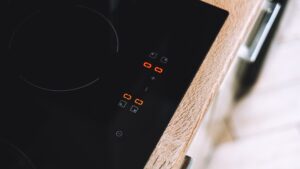
F9 is a problem on the F-series induction family (HI1655M and related boards) that is not a hardware failure at all. The manual states the cause plainly: two or more buttons are being pressed at the same time, accompanied by a continuous beep, and the instruction is simply not to operate more than one button at once. This usually happens by accident — a hand resting near the control strip, a cloth or object left on the panel, or a child touching multiple zones at once. It is the most owner-resolvable code in the entire F-series table.
Symptoms
Line the points below up against your Asko cooktop to be confident this is the problem you are dealing with and not a similar one. A cooktop can display a single symptom or several at once, whether they build slowly or appear abruptly after a surge, a spill, or recent installation and testing.
- F9 appears together with a continuous, uninterrupted beep rather than a single alert tone.
- The problem clears the moment contact with the control panel is reduced to one point.
- It often coincides with something resting on the touch strip, such as a towel or utensil.
- Multiple zones may appear locked out simultaneously while F9 is displayed.
Common causes
The same symptoms on an Asko cooktop point to several possible problems, so the causes here start with the most common. Ruling each out in turn shows whether your cooktop has a quick fix or a problem that needs proper diagnosis and the right parts.
- Two or more buttons pressed simultaneously by a hand or arm — brushing the control strip while working near the hob.
- An object left resting on the touch controls — a cloth, spoon, or splash of liquid bridging multiple touch points.
- A child or pet touching the panel — multiple simultaneous contact points trigger the same detection.
- Water or grease film across the control strip — moisture can register as several touches at once even without direct contact.
Troubleshooting steps you can try
Go through the steps on your Asko cooktop from top to bottom before booking a repair, since the early ones cover the common causes. The moment mains voltage, gas, a hot cavity, water, or a sealed component enters the picture on the cooktop, hand the job to a qualified technician.
- Remove any object, cloth, or spillage resting on the touch control panel.
- Wipe the control strip dry and clean before touching it again.
- Touch only one control at a time and wait for the beep to confirm registration before pressing another.
- If the problem persists with a clean, dry panel and only one point of contact, treat it as a control panel issue rather than an accidental double-press.
Parts a technician may replace
Once the problem on your Asko cooktop is confirmed, the parts a technician is most likely to inspect, test, or replace are the touch control panel. Each one is matched to your cooktop by model, serial, and Art. No. so the exact component fits this cooktop, and only genuine OEM or trusted-supplier parts go back into it — never a generic stand-in.
When to call a technician
A technician tests individual touch zones for false triggering if F9 keeps appearing on a clean, dry panel with no accidental contact. Rated Low, this condition is not urgent for your Asko cooktop — though where F9 persists on the cooktop after the checks, a technician confirming the problem first will save replacing the wrong component. Repairs to your Asko cooktop are carried out independently, with no tie to Asko, Gorenje, or Hisense; we use experienced technicians and genuine OEM or trusted-supplier parts, and stand behind the labor on your cooktop for 30 days. When you book, have your Asko cooktop’s model, serial, and Art. No. to hand so the exact part for your build is matched before the visit and F9 is put right in as few trips as possible.
Related help and Asko resources
For a persistent F9 on your Asko cooktop, book Asko cooktop repair, read our other cooktop error-code guides, follow the step-by-step repair guides, schedule service whenever works for you, or check your city on our locations page. Complete model and specification details for your Asko cooktop can be checked at the maker’s site, global.asko.com.